CRM & your guests
What it's for
CRM is your guest book — who your customers are, how often they visit, what they spend, and how to keep them coming back. Profiles are built automatically as guests order and are billed, and you can add or enrich them by hand.
CRM is a paid feature. If you see a lock beside CRM in the sidebar, it's on a higher plan than yours.
Where to find it
- Web
- iOS
- Android
Choose CRM in the sidebar's overflow (⋯) menu (route /crm).
Open CRM from the app.
Open CRM from the app.
The CRM has five tabs: Overview, People, Feedback, Email Studio, and Loyalty Settings.
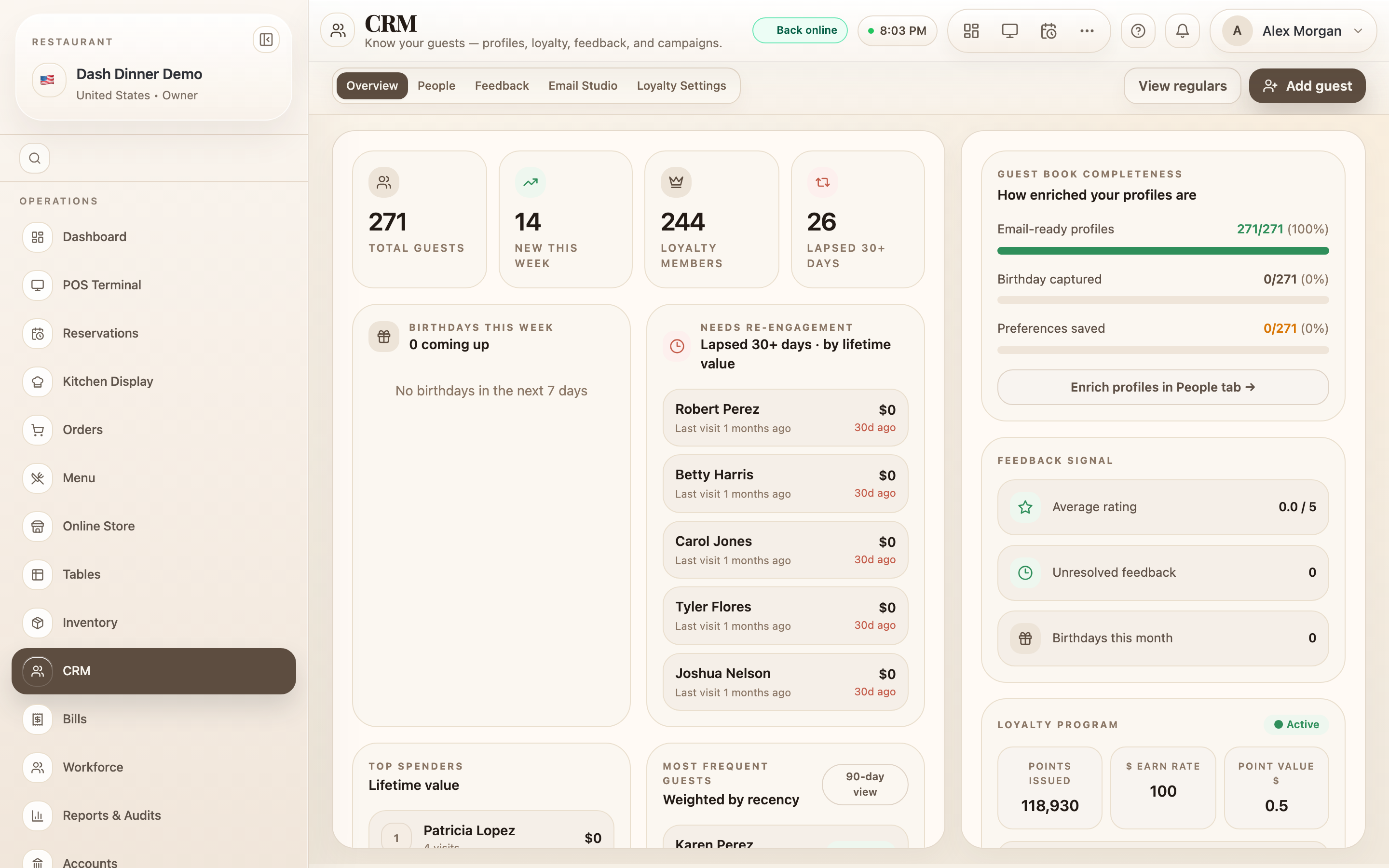
The Overview
Overview is a dashboard of relationship signals. Along the top, count tiles: Total guests, New this week, Loyalty members, and Lapsed 30+ days. Below, signal cards surface who to act on — Birthdays this week, Needs re-engagement, Top spenders, Most frequent guests — plus a Guest book completeness panel showing how many profiles have email, birthday, and preferences saved. Click any guest to jump to their profile on the People tab.
The guest book (People tab)
The People tab is a searchable table of guests with a detail panel alongside.
- Search by "name, phone, email, or address".
- Filter by order band (1-5 orders, 6-20 orders, 20+ orders) and loyalty state (Has points / No points).
- Sort by clicking a column — Guest, Orders, Avg Order, Lifetime, Last Visit.
Each guest carries a segment pill based on how much they visit and spend — VIP regular, Growing regular, Newly engaged, or Profile only — and an Email ready badge when they can be emailed. Use View regulars (top right) for a ranked list of your most frequent guests.
Add a guest
Choose Add guest. In the New Customer form, enter a First Name (required) and, optionally, Last Name, Phone, Email, Birthday, Preferences, Address, and Notes. Tick Allow email updates if they've agreed to hear from you, then choose Save.
Most profiles create themselves — when you attach a guest to an order at billing, they're added to the directory automatically. Adding by hand is for guests you meet before they order.
Worked example
Log a walk-in regular. Choose Add guest, enter their First Name and Phone, note a Preference ("window table, no onions"), and Save. Next time they visit, their profile is already there with their history building up.
Tips & things to watch
- ✅ Capture the phone number — it's how repeat visits link to the same profile.
- ✅ Fill in birthdays and preferences — they power the Overview signals and email segments.
- ⚠️ CRM is a paid feature — a lock on the nav means an upgrade is needed.