The POS terminal
What it's for
The POS (point of sale) is where you spend most of service. From one screen you seat a table, build the order, send it to the kitchen, and settle the bill. Everything else in DashDinner supports what happens here.
Where to find it
- Web
- iOS
- Android
Choose POS in the left sidebar (or go to /pos).
Tap POS in the tab bar.
Tap POS in the navigation bar.
The three areas of the POS
The terminal is organised into three areas that work together:
- Tables / floor — see which tables are free, occupied, or need attention, and seat guests.
- Menu — browse items by category and add them to the current order.
- Order panel — the running order, where you set the order type, review items, and settle.
Web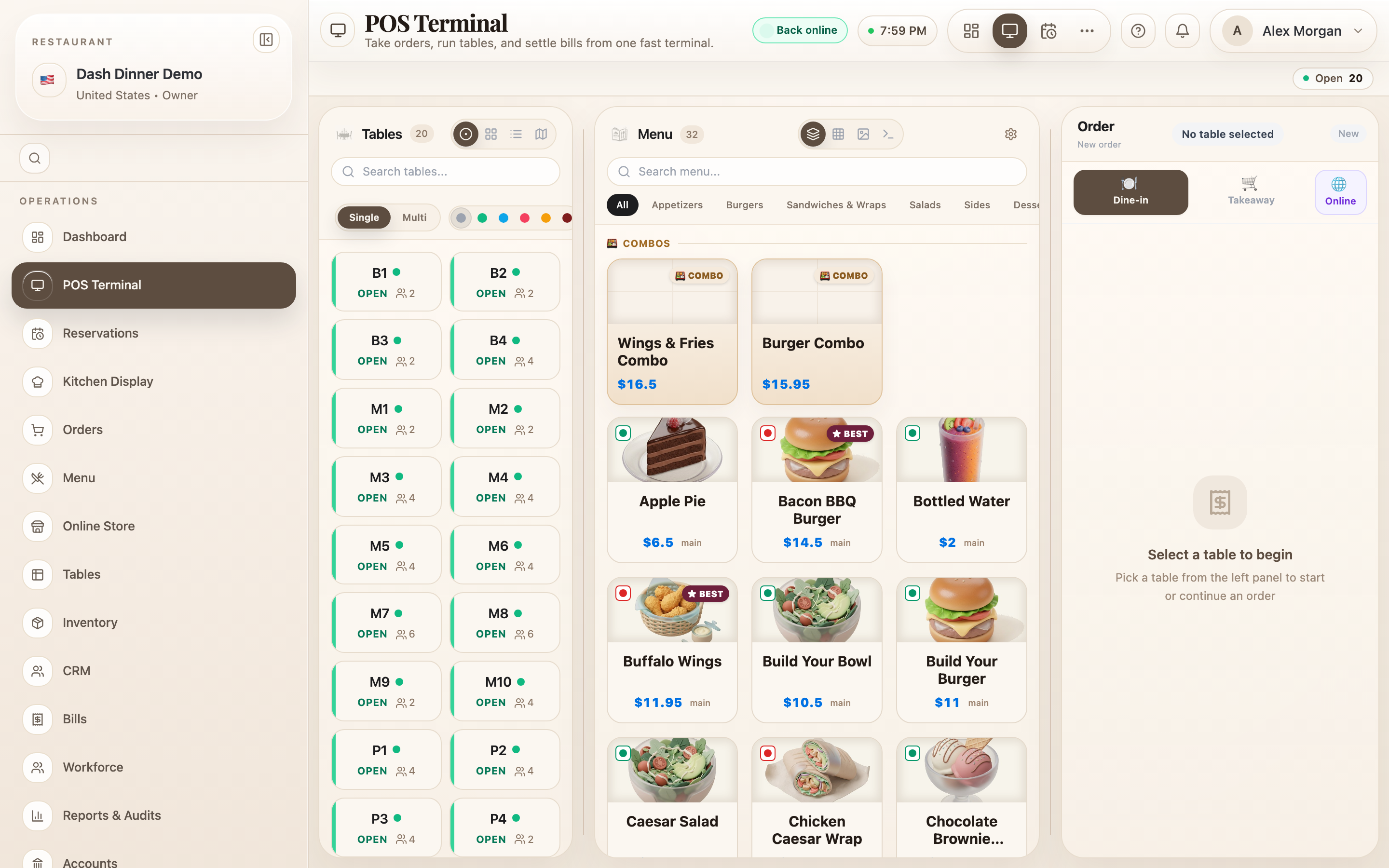
Order types
Every order is one of three types, chosen with the mode toggle above the order panel:
- Dine-in — served at a table.
- Takeaway — collected at the counter.
- Delivery — sent to the guest's address.
The type controls what DashDinner asks for next — a table for dine-in, delivery details for delivery — so pick it first.